 All VME modules (S9418 adcs; CAEN adcs/tdcs and the Acquisition Control module) must first be configured correctly by installing
the appropriate jumpers.
All VME modules (S9418 adcs; CAEN adcs/tdcs and the Acquisition Control module) must first be configured correctly by installing
the appropriate jumpers.
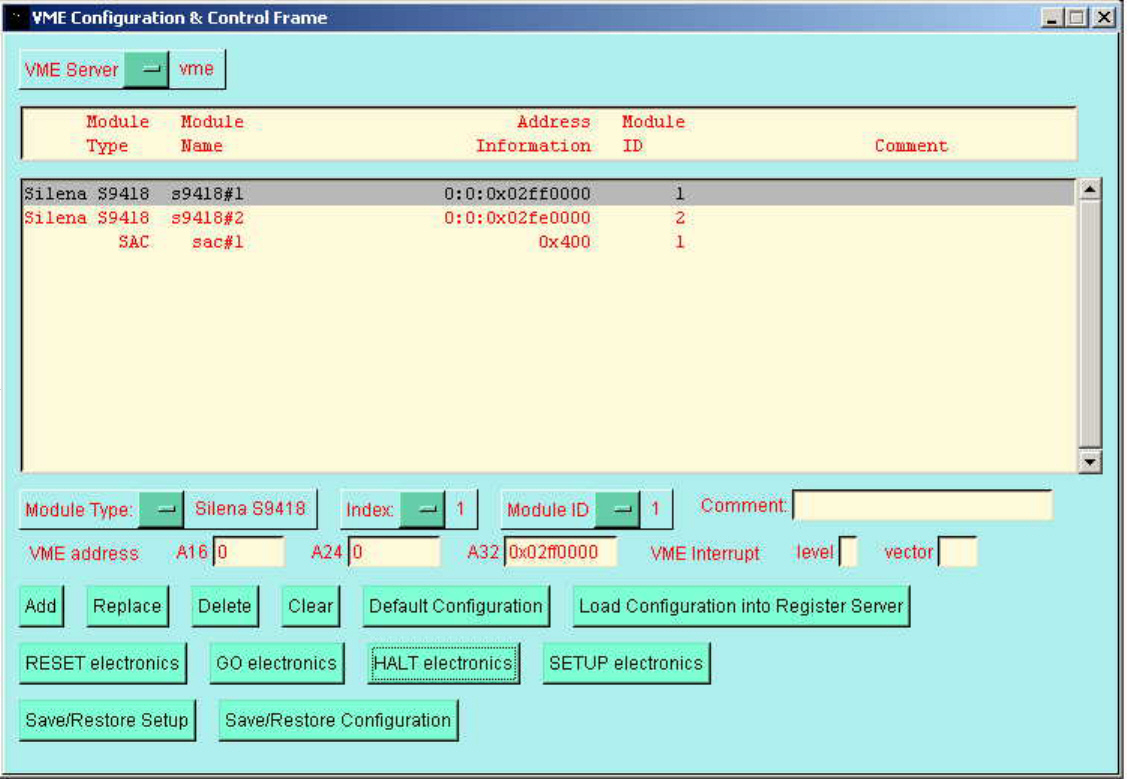
Creating the VME configuration
All VME modules (S9418 adcs; CAEN adcs/tdcs and the Acquisition Control module) must first be configured correctly by installing
the appropriate jumpers.
Acquisition Control module.
It is recommended that you use the default VME base address (0x0400).
Select Module Type = SAC; Index = 1; Module ID = 1.
Set VME address A16 = 0x0400; A24 = 0; A32 = 0
Then click on the button Add
Silena S9418 adc.
Select Module Type = Silena S9418
Each adc must have a different Index and Module ID.
Module ID should be set in the range 1 => n where n is the number of Silena adcs in your configuration.
In the current release of the software Index should be equal to Module ID.
Set VME address A16 = 0; A24 = 0; A32 to the VME base address selected by jumpers for the module.
NOTE - the base address MUST be less than 0x05800000.
For each adc click on the button Add
CAEN V785 adcs; V775 tdcs; V767, V1190, V1290 tdcs.
Select Module Type = CAEN V785 etc
Each adc/tdc must have a different Module ID.
Module ID should be set in the range 1 => n where n is the combined number of CAEN adcs and tdcs in your configuration.
Index should be set in the range 1 => m for each CAEN module type where m is the number of CAEN adcc/tdcs for that module type.
Set VME address A16 = 0; A24 = 0; A32 to the VME base address selected by jumpers for the module.
NOTE - the base address MUST be less than 0x05800000.
For each adc click on the button Add
Other VME modules (such as VME scalers) may also be added as required. These will be ignored by the data acquisition software for purposes of event by event data readout.
Finally click on the button Load Configuration into the Register Server
This configuration automatically becomes the default configuration for the VME server.